Welcome to Kolinux Developer Guide 😎
Introduction
This Developer Guide is designed for developers interested in working with Kolinux in the following manner:
- Customise Kolinux for specific operating needs
- Extend the functionality of Kolinux
This guide will bring you through the overall design of Kolinux, the various implementations and their mechanisms. We have also provided insights into our target users to allow you to better understand the reasons behind the various methods of implementations.
Table of Contents
- Acknowledgements
- Setting up and Getting started
- Design
- Implementation
- Product Scope
- User Stories
- Non-Functional Requirements
- Glossary
- Instructions for manual testing
Acknowledgements
- User Guide and Developer Guide of AddressBook Level-3
- NUSMods API
- GSON
- JUnidecode
Setting up and getting started
Setting up
- Fork our repository and clone into your computer
- Configure JDK: Ensure your IDE is configured to JDK 11
- Import the project as a Gradle Project
- Verify the setup by running
seedu.Kolinux.Main- Try out a few commands and ensure they’re working properly
- Run the tests and ensure all of them past the test cases
Before writing code
- Configure the code style
- Ensure that your coding style matches our coding style
- Set up Continuous Integration
- This project comes with a
gradle.ymlfile so each time you push, Github will run the CI for your project automatically.
- This project comes with a
- Learn the design
- Look through the overall design by looking through Kolinux’s overall architecture
Design
Main Components of the Architecture
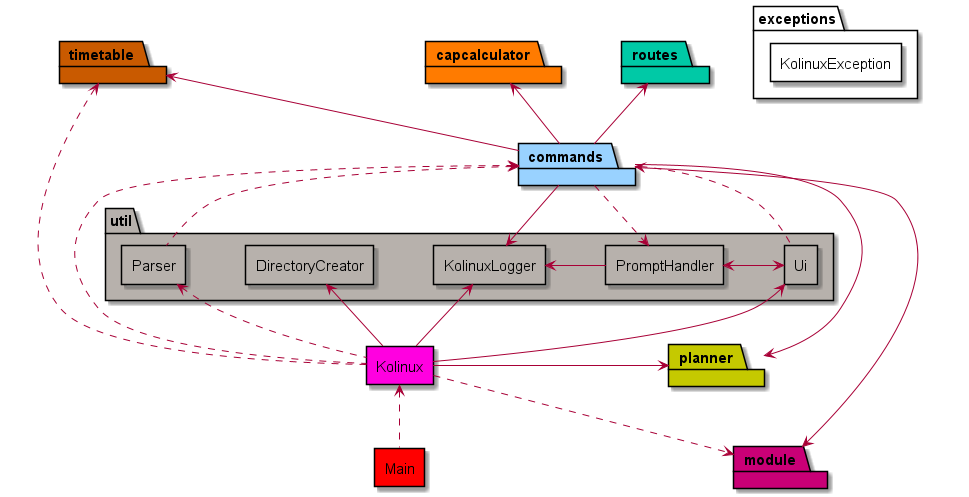
This section describes the overall design architecture of Kolinux.
The Main class is responsible for initializing the main components upon start-up of the application, and
deciding the execution path of the application through the main components based on reading the user inputs.
The application consists of the following main components responsible for the high-level execution of a user input:
Kolinux: Initializes the components in the correct sequence, and connects them up with each other.util: Collection of utility classes.util.Ui: User interface of the application.util.Parser: Makes sense from the user input and decides whichCommandclass to initialize.util.DirectoryCreator: Ensures the/datadirectory is created and present for data storage.util.KolinuxLogger: Logs the user activity intodata/logger.log.util.PromptHandler: Handles prompts when user confirmation is required to perform certain operations.
commands: Collection of user commands that determines execution.routes: Collection of classes used by Bus Route Finder feature.module: Collection of classes used by Module Manager feature.timetable: Collection of classes used by Timetable feature.planner: Collection of classes used by Planner feature.capcalculator: Collection of classes used by CAP Calculator feature.
The architecture diagram below shows a high-level overview of the structure between different components.
❕ Note: Each component is coded with a different colour and the same colour coding is applied to the rest of this document.
Commands Component
The class diagram below describes the structure of the commands component.
❕ Note: XYZCommand in this diagram represents HelpCommand, ExitCommand, and InvalidCommand.
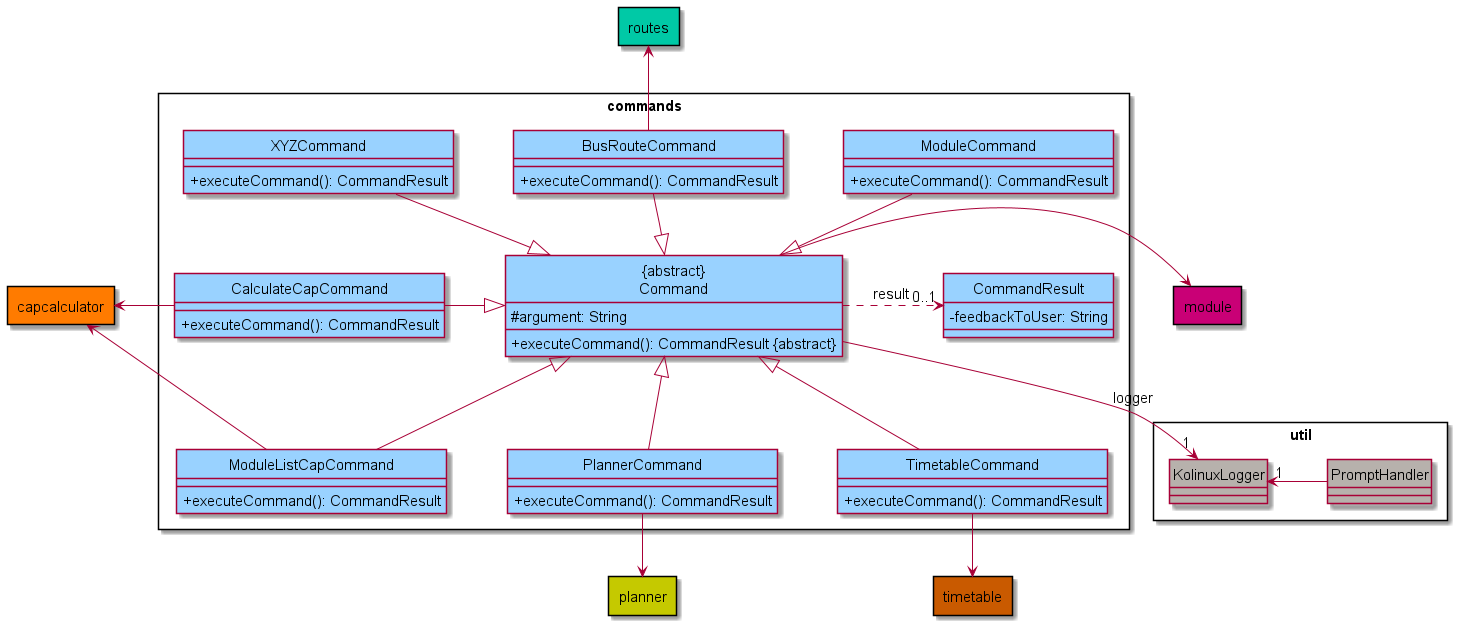
All Command classes inherit from the abstract Command class, which has an association with KolinuxLogger so that
every command execution has a corresponding log in data/logger.log. The structure between each individual command and other components are
also shown in the diagram above. These structures will be further elaborated in the sections below.
Module Component
The class diagram below models the structure of the module component
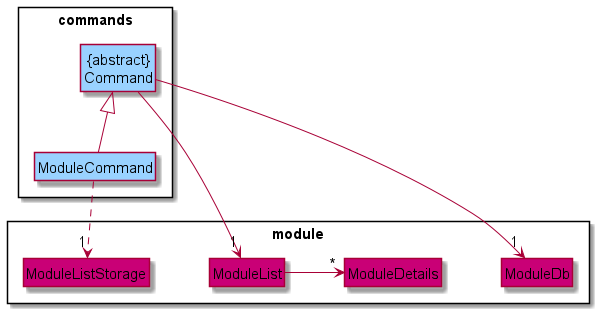
The ModuleCommand class is responsible for the execution of all module related commands. It inherits references
to instances of ModuleList and ModuleDb from Command which are utilized for maintaining a list of
ModuleDetails instances and operating a repository of moduleDetails( ModuleDb) respectively. ModuleCommand
also interacts with ModuleListStorage to facilitate the persistent storage of the contents of ModuleList.
Timetable Component
The class diagram below describes the structure within in the timetable component
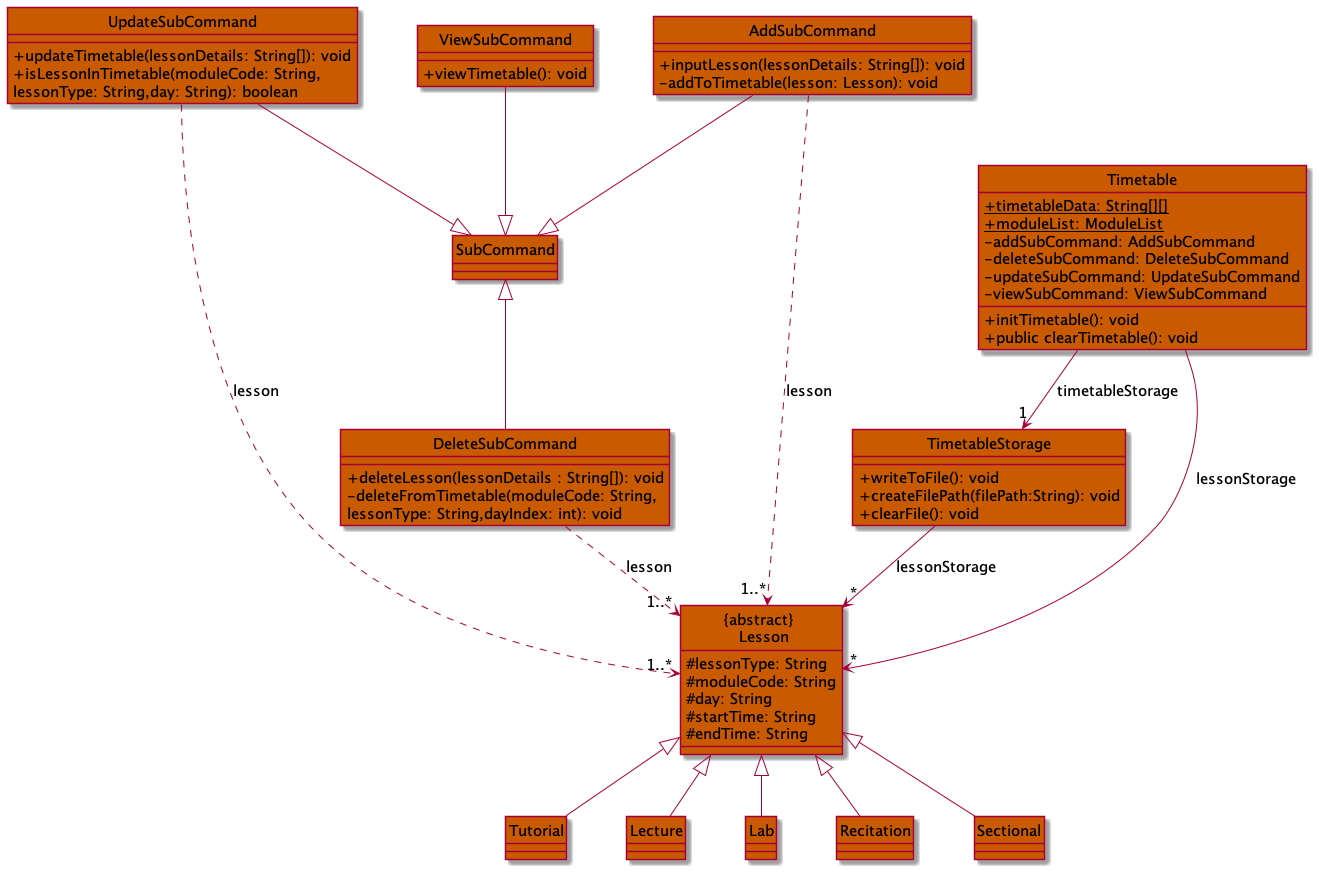
The Timetable class is the main part in this component that is responsible for all timetable related command
executions. Timetable maintains a list of all Lessons in lessonStorage and an association with
TimetableStorage for storage of Lesson data in data/timetable.txt.Lesson has 3 types Tutorial,
Lecture and Lab which are specified by its lesson type, TUT, LEC and LAB respectively.
AddSubCommand, DeleteSubCommand, UpdateSubCommand and ViewSubCommand are called to execute
timetable add, timetable delete, timetable update and timetable view commands respectively.
Planner Component
The class diagram below describes the structure within the planner component.
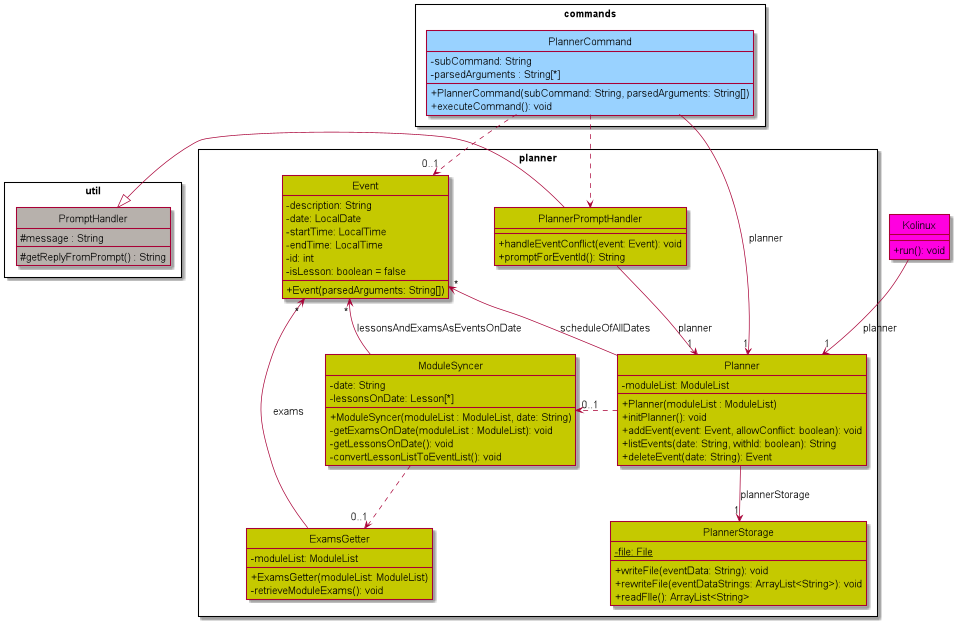
The Planner class is the main part in this component that is responsible for all planner related command
executions. The Planner maintains a list of all existing Events, and an association with PlannerStorage for
storage of Events data in data/planner.txt. To communicate with other components such as timetable and module,
the ModuleSyncer and ExamsGetter are the main bridges to fetch Lessons and exams data for Planner.
CAP Calculator Component
The class diagram below describes the structure between CapCalculator and its subclasses.
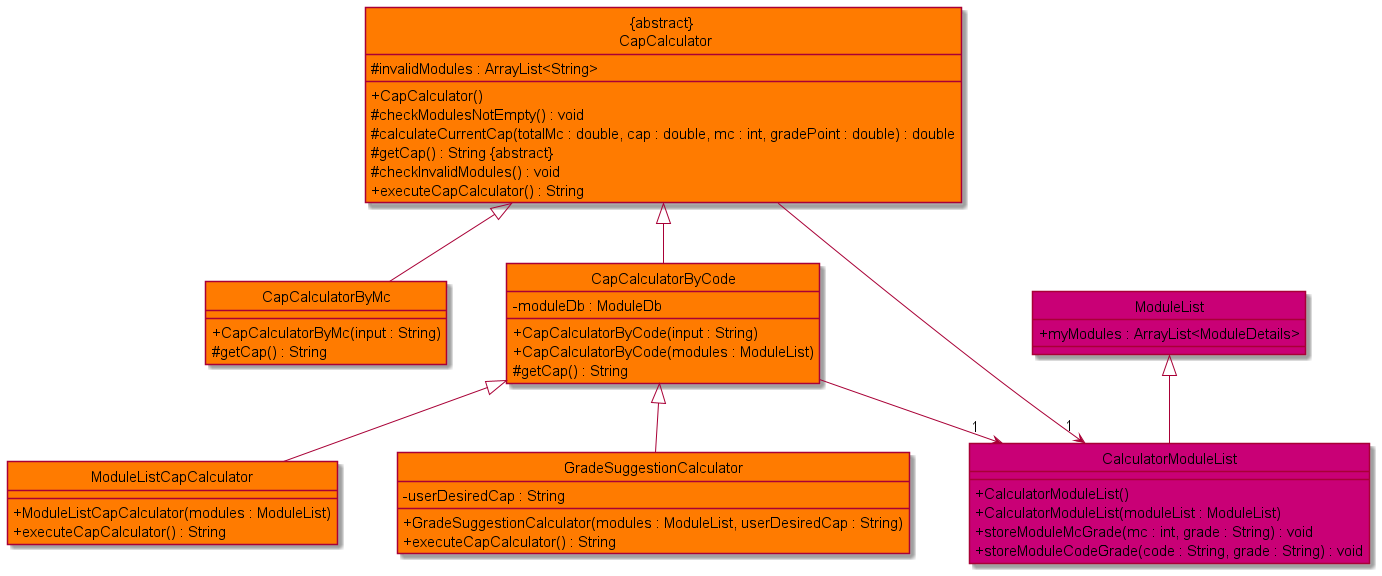
The CapCalculator is an abstract representation of calculator which is inherited by every calculator classes.
It contains the list of modules whose grade are being retrieved to calculate the overall cap within
CalculatorModuleList, which is a subclass of ModuleList designed specifically for CapCalculator. Its subclasses
can be divided into two groups based on the module format, namely CapCalculatorByMc which calculates cap of modules
containing only the modular credit and the corresponding grade, and CapCalculatorByCode and its subclasses which can
retrieve modular credit of each module from moduleDb for the calculation.
Bus Routes Finder Component
The class diagram below describes the interaction between Route and its subclasses.
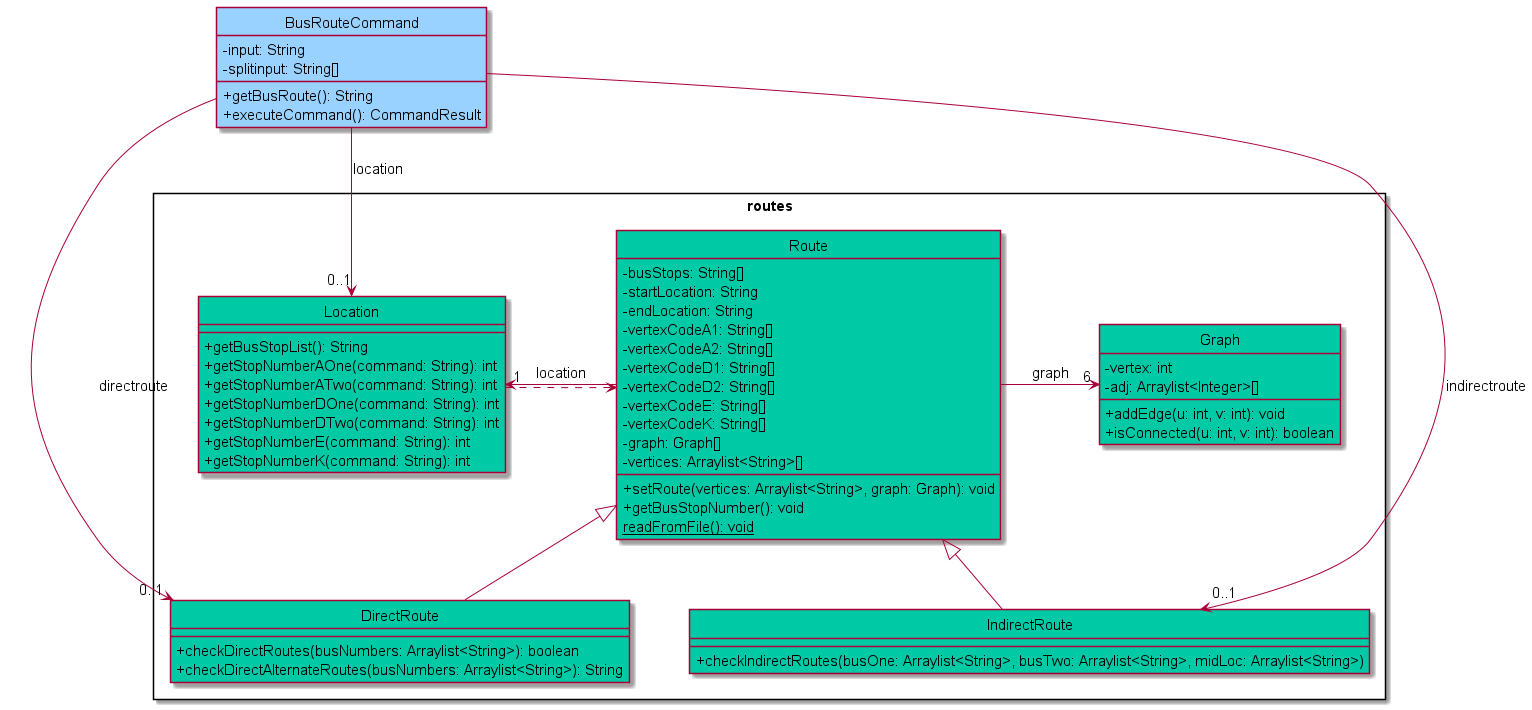
The Route class is a higher level representation of the process to find routes. The DirectRoute and IndirectRoute
classes inherit from the Route class. The BusRouteCommand instantiates DirectRoute and IndirectRoute objects.
The DirectRoute class is responsible to check if there are any direct or direct alternate routes between the 2 user
given bus stops. The IndirectRoute class is responsible to find if there are any indirect routes between the 2 user
given bus stops, i.e a route wherein a user will need to switch buses at an intermediate bus stop. The process of checking
whether 2 points on a graph are connected is facilitated by the Graph class and achieves this process by using BFS. A
Location class object is instantiated by the BusRouteCommand class if the user wants to view the list of all bus stops
in the network.
Command Execution
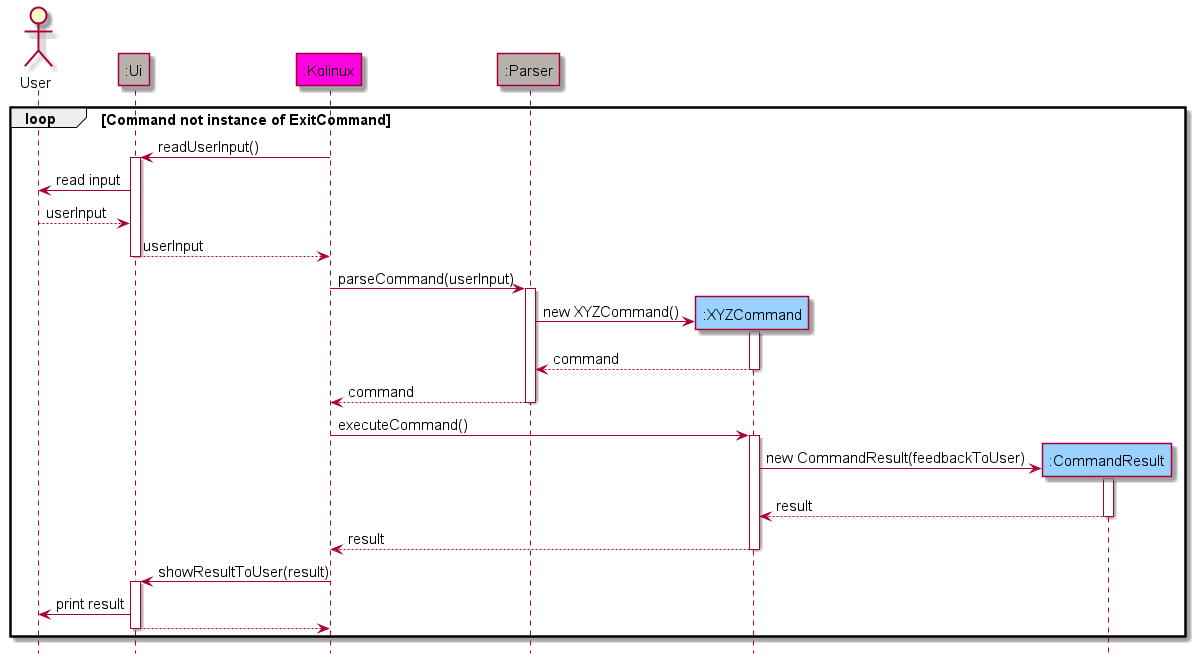
The sequence diagram below shows a high-level overview of the interaction between entities during the execution of a user input (XYZCommand represents any class that inherits from Command).
Implementation
This section describes some noteworthy details on how some features are implemented along with more detailed representations of the interactions between components.
Add to timetable feature
The timetable add mechanism is facilitated by Timetable where the format of the input is as such:
timetable add MODULE_CODE/LESSON_TYPE/DAY/START_TIME/END_TIME. The lessons added to Timetable
via inputLesson(String[] lessonDetails) is stored in the lessonStorage within the program via
the method addLesson(Lesson lesson) and locally in TimetableStorage which saves it
to timetable.txt file to constantly save the lessons’ data. It implements the following operations:
Timetable#inputLesson(String[] lessonDetail)containingTimetable#addLesson(Lesson lesson)- Adds the lesson totimetableStoragebased on the type of lesson it is, which is included in the lessonDetail.TimetableStorage#writeToFile()- Saves the lesson details totimetable.txtlocally.
❕ Notes about the methods:
String[] lessonDetailsconsists ofMODULE_CODE,LESSON_TYPE(TUT- tutorial,LEC- lecture orLAB- lab),DAY,START_TIME,END_TIME.- Lesson class is inherited by
Tutorial,LectureandLabto add lessons based on theLESSON_TYPEas shown in the example below.
Given below are the examples of the usage of timetable add of lessons to the timetable.
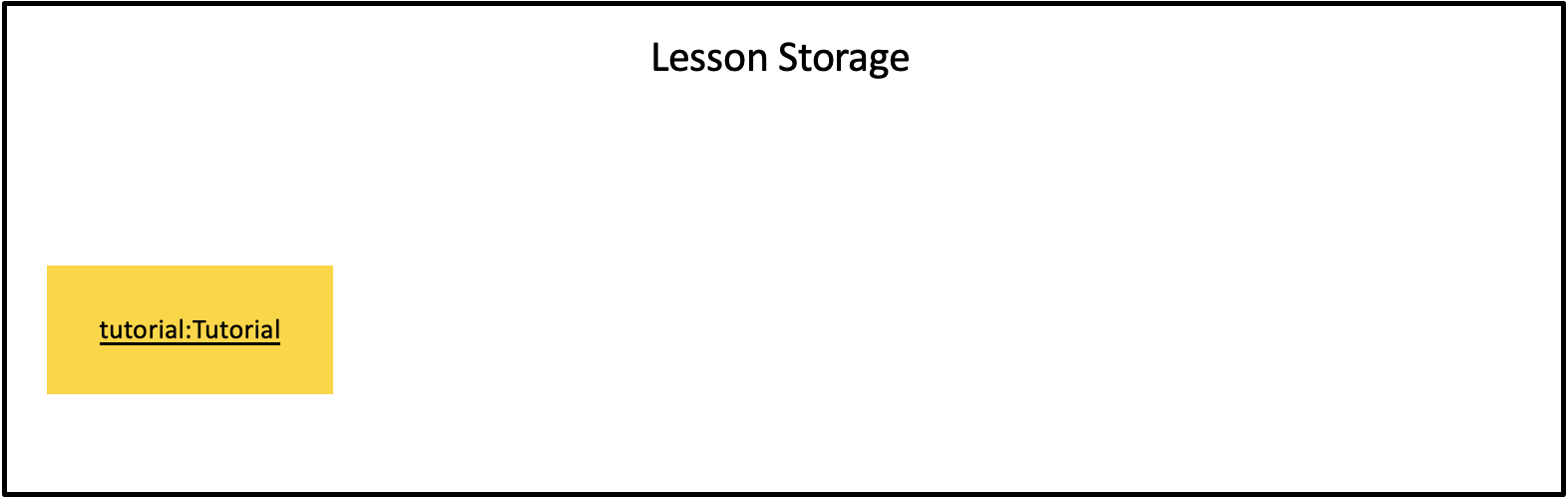
Example 1: Adding a tutorial to the lessonStorage ( lesson of type TUT )
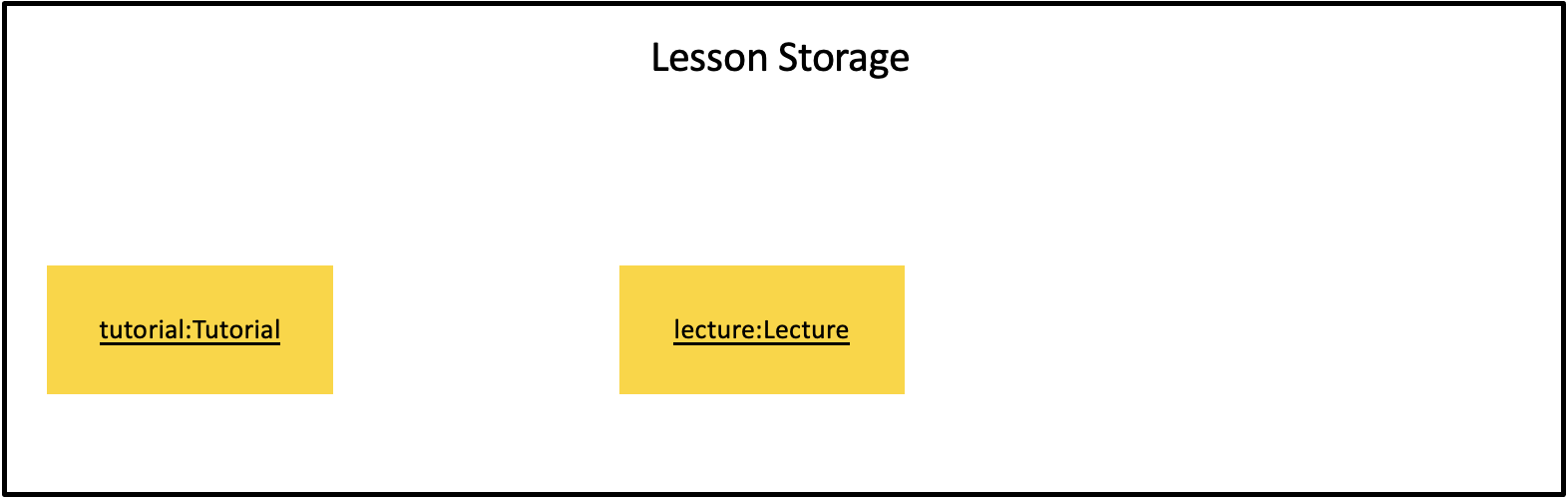
Example 2: Adding a lecture to the lessonStorage ( lesson of type LEC )
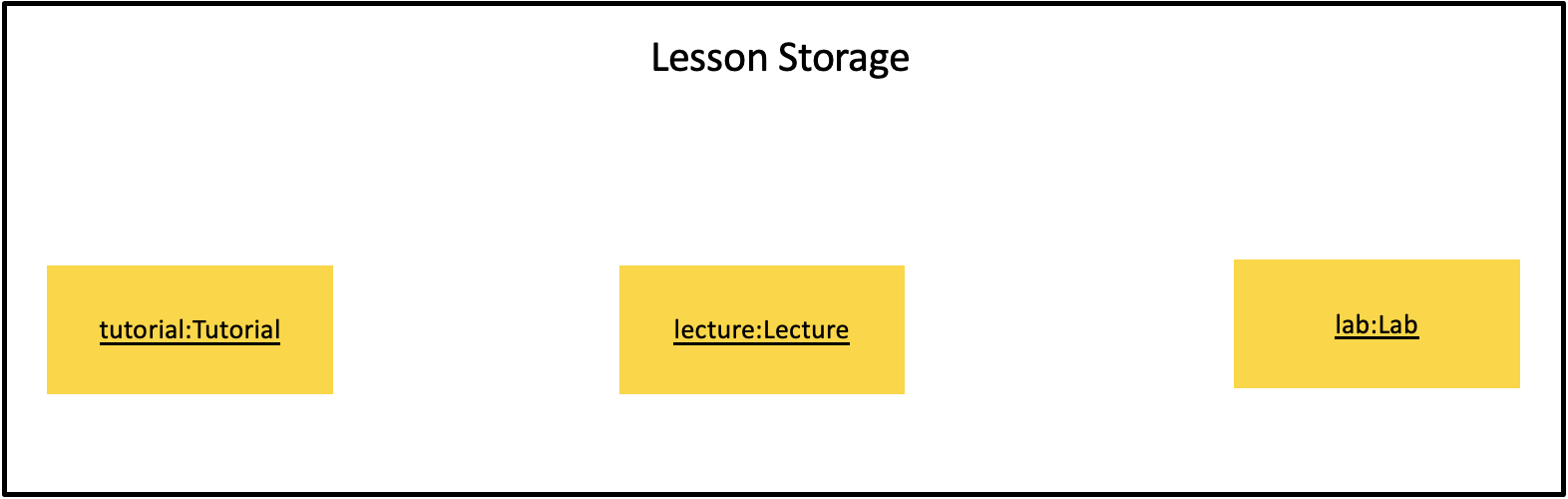
Example 3: Adding a lab to the lessonStorage ( lesson of type LAB )
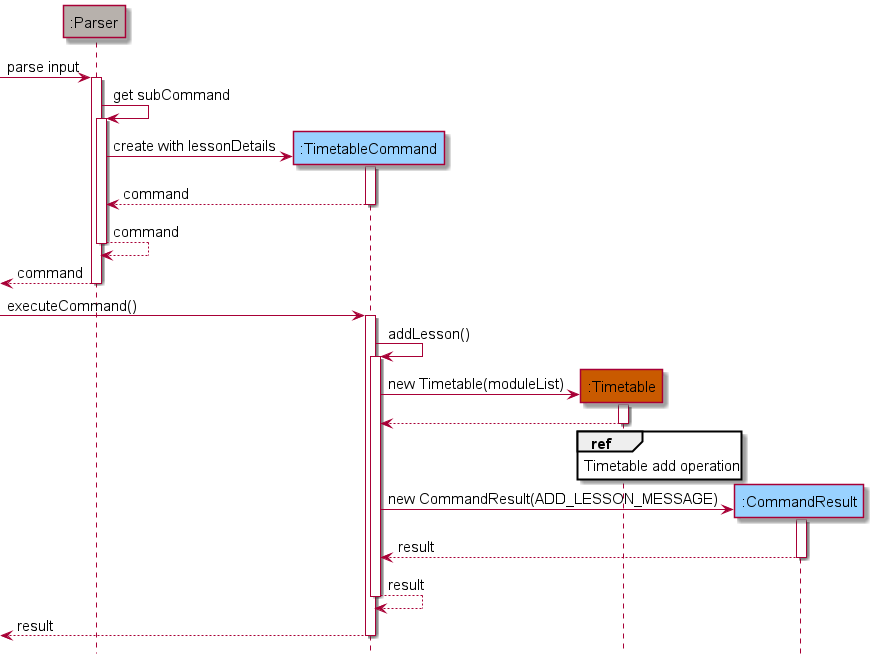
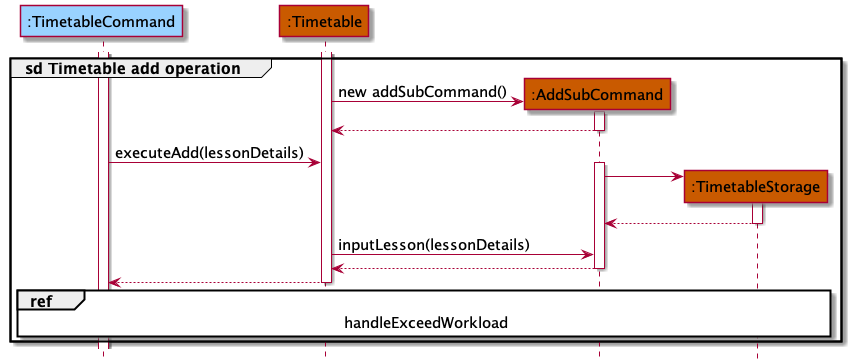
The following sequence diagrams shows the timetable add mechanism:
❕Note: The sequence diagram for the add mechanism has been split into 2 parts for better readability:
- The following diagram shows the sequence of parsing the user input and executing
TimetableCommand#addLesson()for thetimetbale addcommand
- The following diagram shows the sequence of adding the specified lesson from the user input to the
timetable via
Timetable#executeAdd(lessonDetails)which is then written to thetimetable.txtstorage file viaTimetableStorage#writeToFile()
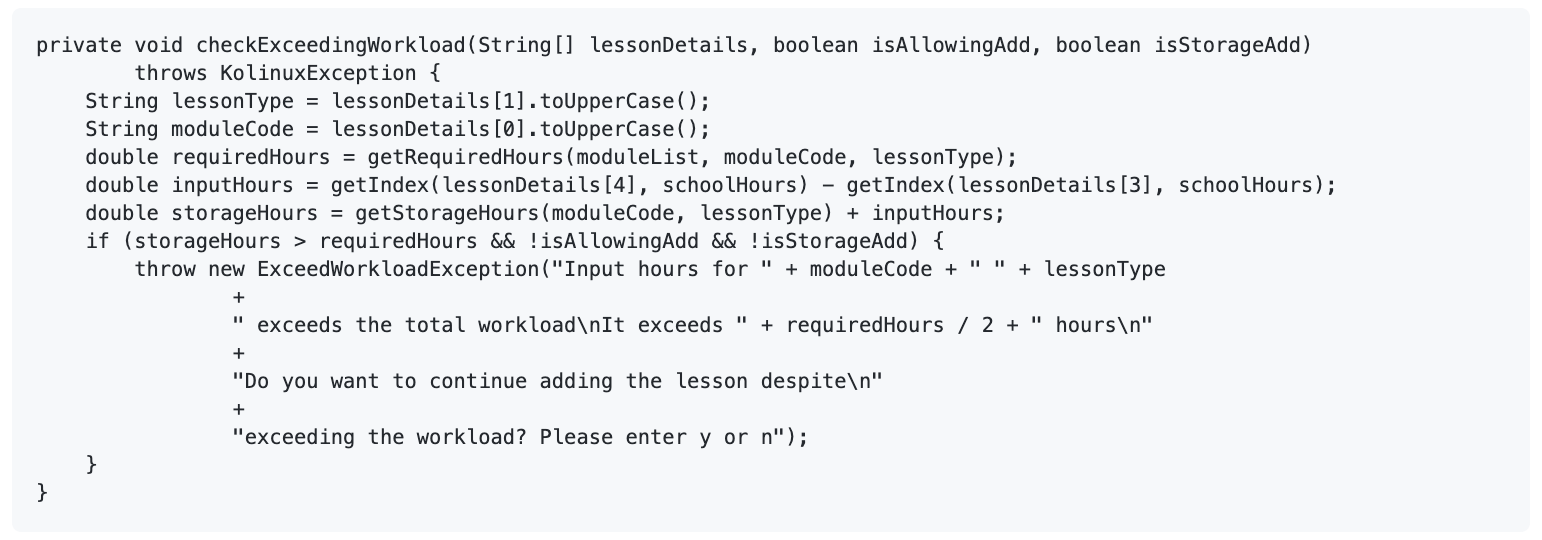
- Due to a few inaccuracies in the api for the prescribed workload for certain modules, users are given the liberty to
exceed the workload whilst displaying a warning as to what the prescribed workload is. For this we have made use of the
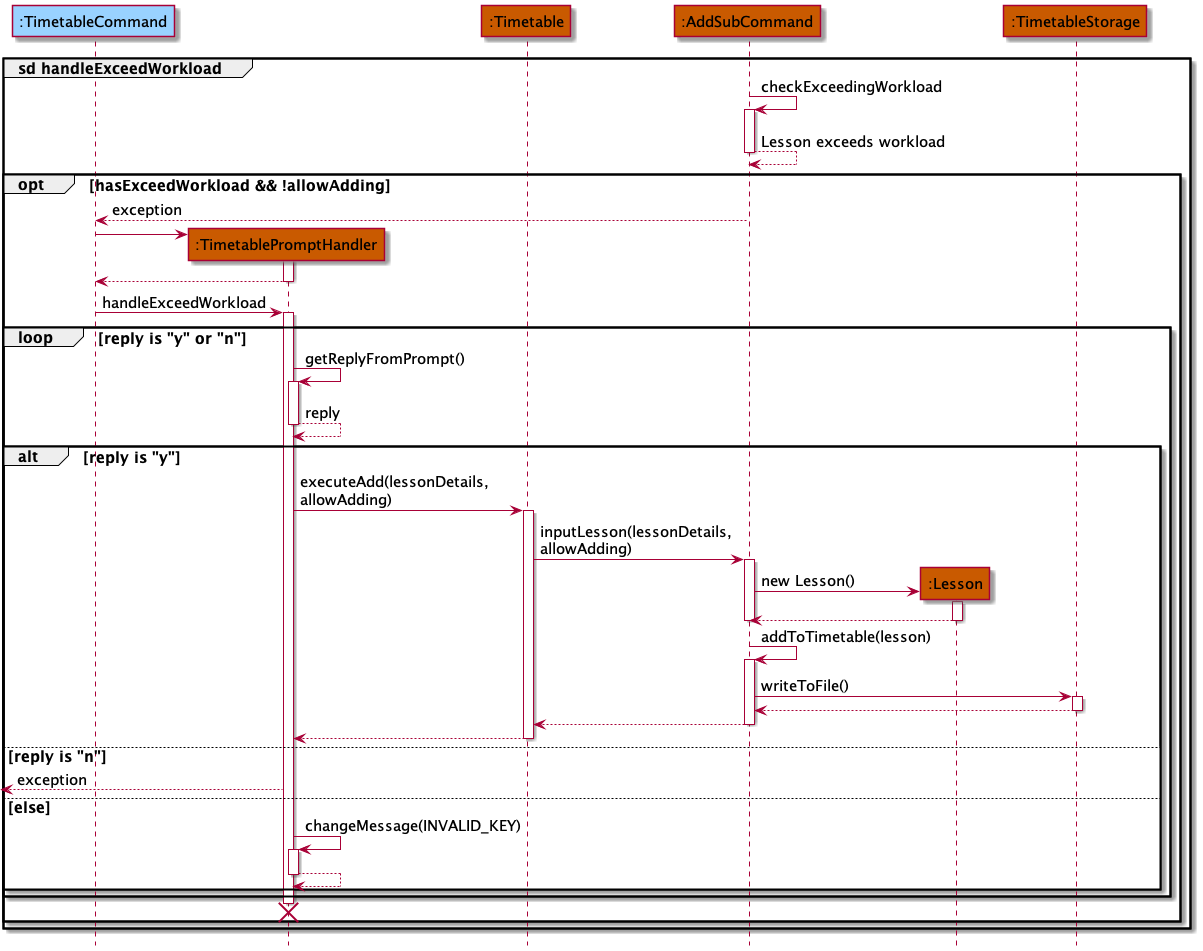
PromptHandlerjust like we did inplannerto get a reply from the user in order to continue adding with the lesson. - The following code illustrates how to check if the lesson inputted exceeds the workload.
- The following sequence diagram illustrates what happens when input hours exceed the workload and what the program does to handle this exception before adding the lesson to the timetable.
Add to Planner feature
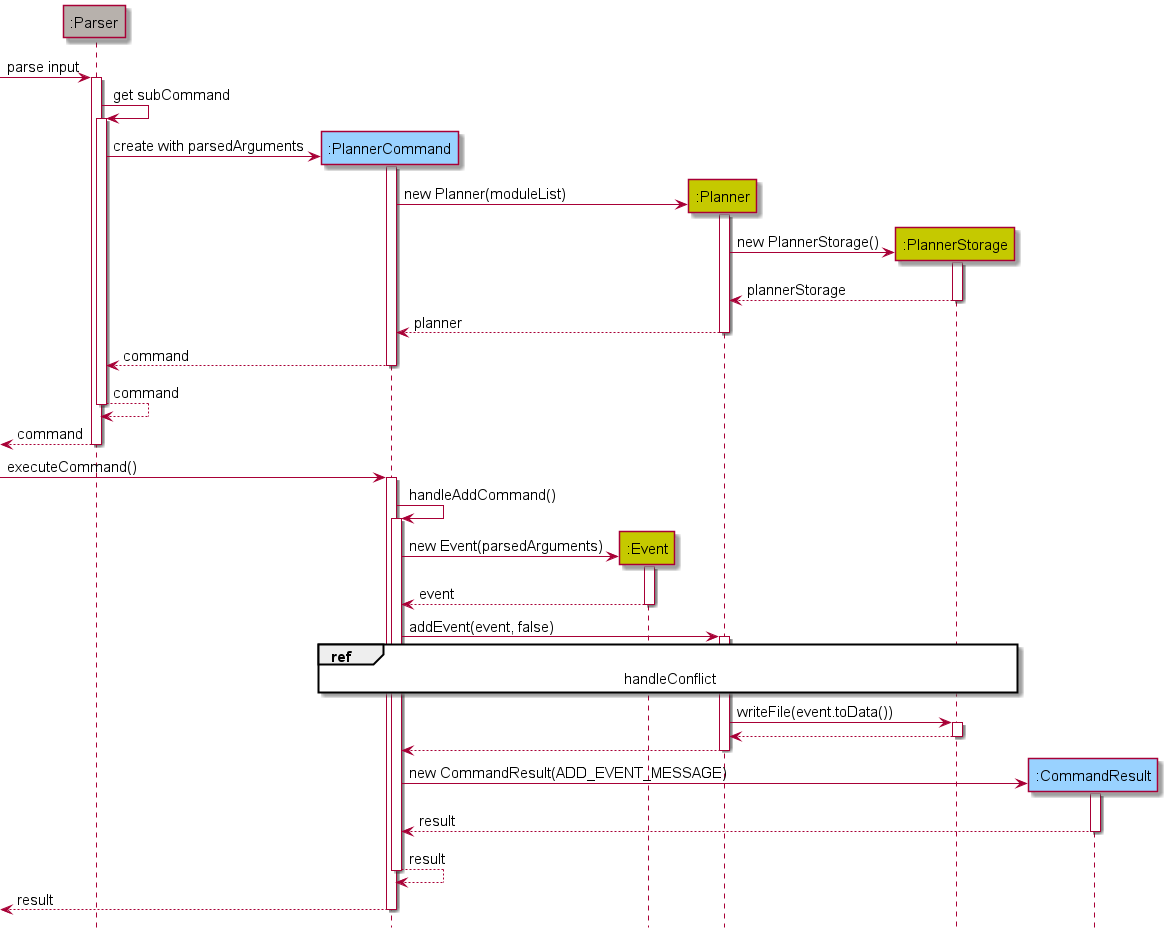
The Add to Planner mechanism is mainly facilitated by PlannerCommand, Planner, and PlannerPromptHandler. After entering the appropriate
input to add an Event to the Planner, PlannerCommand is constructed with subCommand add and the
relevant parsedArguments. The constructor of PlannerCommand involves creation of Planner and PlannerStorage
to initialize the adding and writing to file operations.
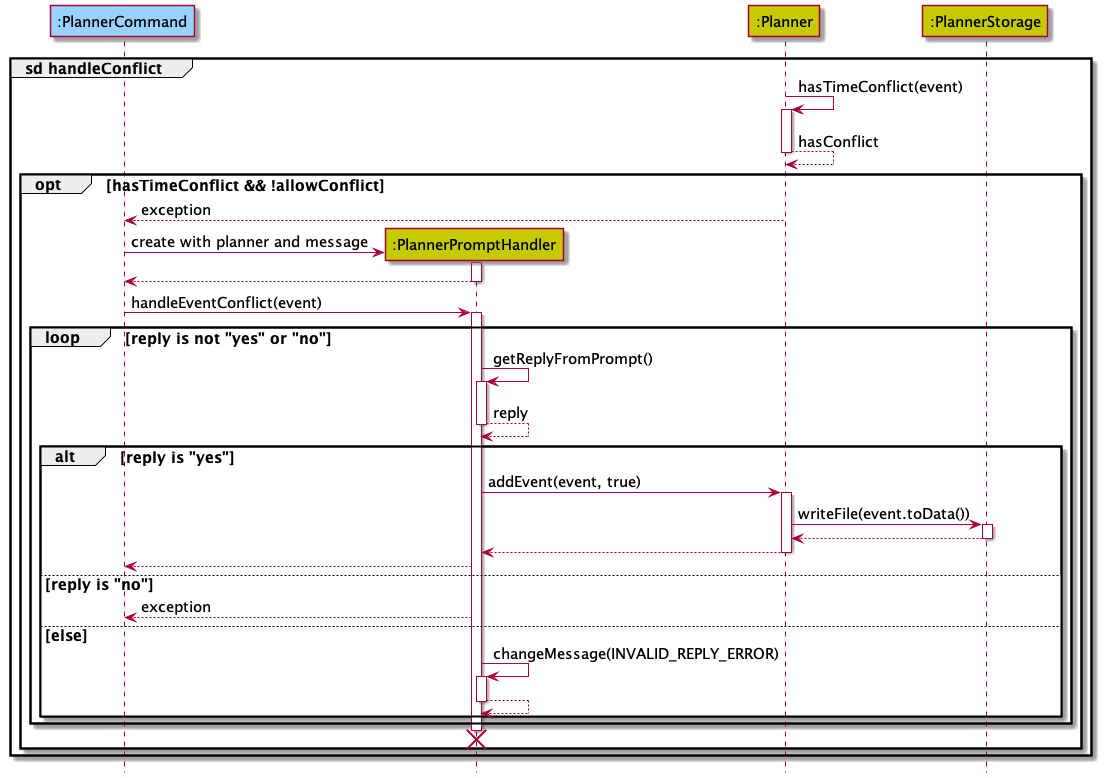
Before the Event is added, it is first checked for any time conflicts with existing events/lessons/exams. Events
are only added if there are no time conflicts or the user allowed the addition of the conflicted Event through a
prompt to get a confirmation from the user. Events added to the Planner are stored in a list
scheduleOfAllDates which contains all added Events by the user. The data in this list is also written to the
internal storage data/planner.txt through PlannerStorage which saves the user data locally.
This mechanism is implemented by the following methods:
Planner#addEvent(Event event, boolean allowConflict): Attempts to addeventtoscheduleOfAllDatesby invoking the following methods:Planner#hasTimeConflict(Event event): Checks for any time conflicts betweeneventand any existingEvents inscheduleOfAllDates, lessons, and exams.PlannerStorage#writeFile(String data): Appends the data of the newly addedEventtodata/planner.txtfor local storage.
PlannerPromptHandler#getReplyFromPrompt(): Gets user confirmation to allow or cancel the add operation in case of a time conflict.
The figures below represent the sequence diagrams of the Add to Planner mechanism:
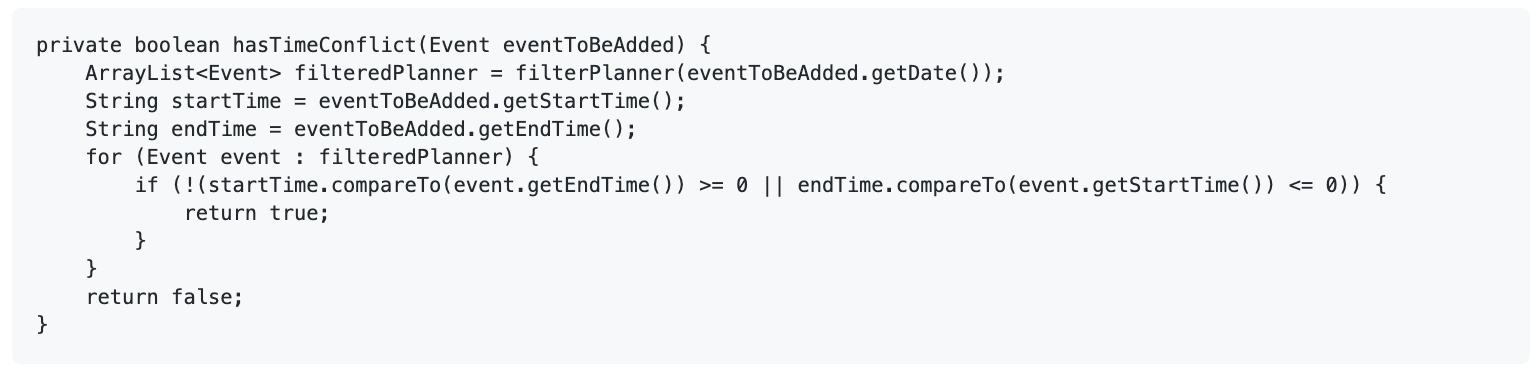
The Planner#hasTimeConflict(Event event) method is integrated with Timetable and ModuleList so that Lessons and
exams may be fetched in addition to scheduleOfAllDates containing the Events to check time conflicts against. The
integration in the method is mainly done via the Planner#filterPlanner(String date) call. The code snippet below
shows how Planner#hasTimeConflict(Event event) invokes Planner#filterPlanner(String date). The return value
filteredPlanner will contain all the existing events/lessons/exams occurring on the date of the event that
is to be added.
The main working mechanism of Planner#filterPlanner(String date) is as follows:
- Construct a
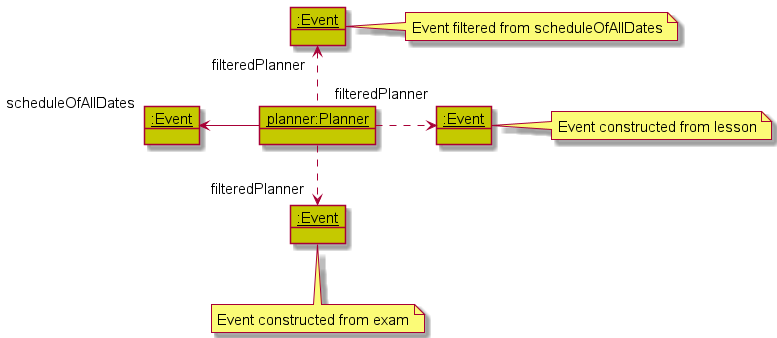
ModuleSyncerobject with thedatespecified. The object will populate a list ofEvents that are constructed using the information of the lessons and exams occurring ondateusing the data fetched fromTimetableandModuleList. Note that anExamsGetteris used byModuleSyncerto interact withModuleListto get the exam dates and times of the modules stored byModuleList. - Get a list of all
Events stored inscheduleOfAllDatesthat occur ondate. - Merge both lists.
- Sort the list by their start times, and return the list.
The list returned will then be used to check for any time conflicts with eventToBeAdded.
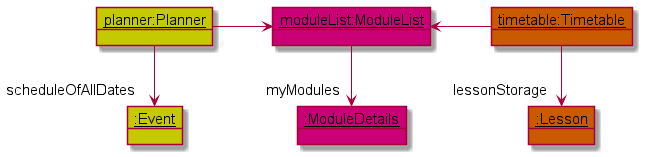
The object diagrams below show the object structure in the memory immediately before and after Planner#filterPlanner(String date) is invoked to
fetch Lesson and ModuleDetails from Timetable and ModuleList respectively. Assume there is only one Lesson,
one ModuleDetails, and one Event stored in Timetable, ModuleList, and Planner respectively, and they all occur on the same date.
Add and delete a module by module code feature
The ModuleCommand class extends the Command class and handles all module related commands. In the context of storage and deletion, operations are performed on a list of ModuleDetails encapsulated in an instance of ModuleList (moduleList). The ModuleList class implements the following methods to achieve this:
ModuleList#addModuleByCode(String code, ModuleDb moduleDb)ModuleList#deleteModuleByCode(String code)
❕ Notes about the methods:
moduleDb is an instance of ModuleDb that contains a hashmap, relating each module’s code (key) to its respective ModuleDetails (value). For storing a module, a ModuleDetails instance corresponding to a module code is appended to the list in moduleList.
The input format for storage and deletion of modules is as follows:
-
Storage:
module add MODULE_CODE -
Deletion:
module delete MODULE_CODE
Given below are examples of the usage of module add/delete and how the add/delete system behaves at each step.
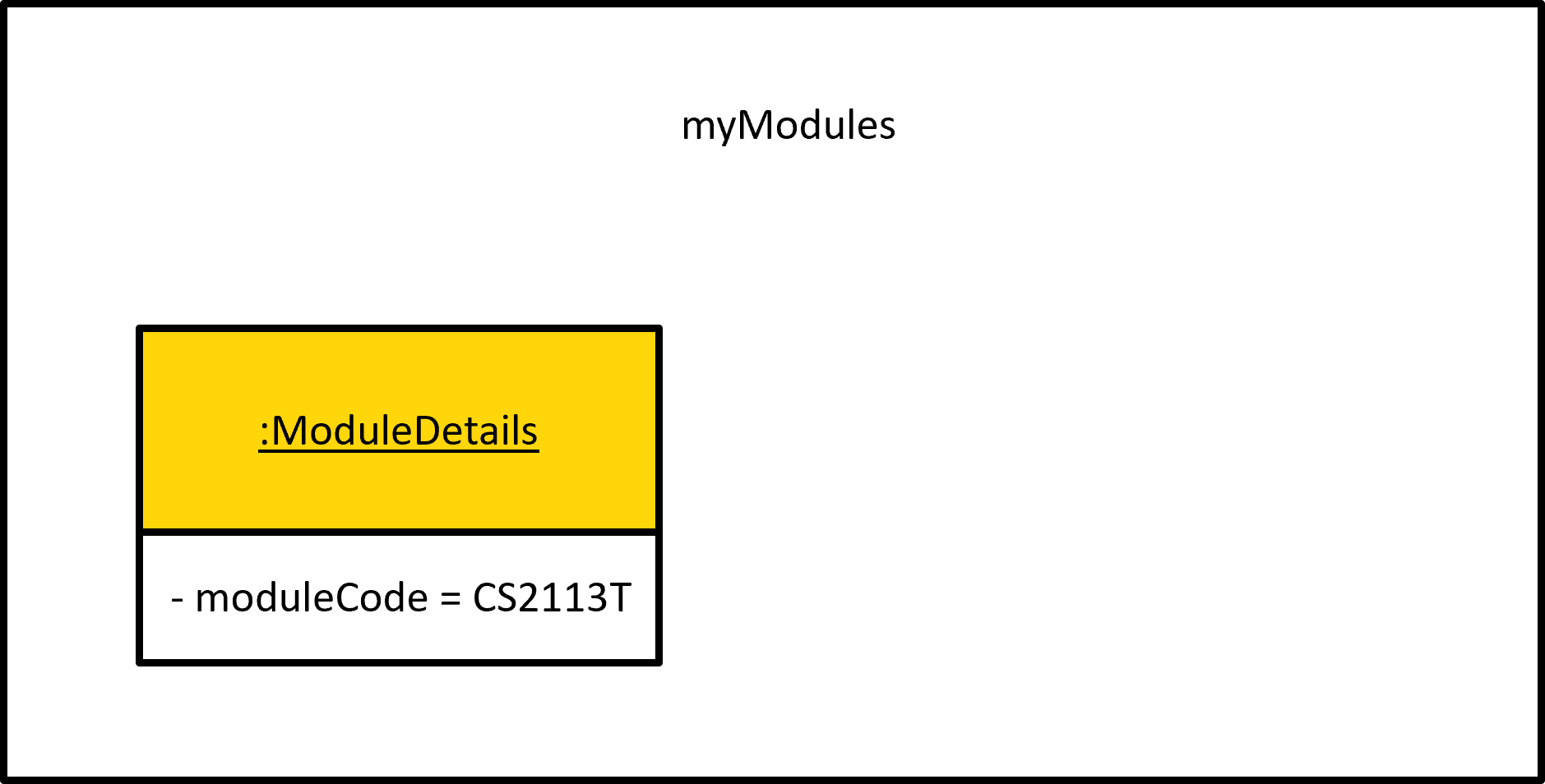
Step 1: The user launches the application. myModules , the list of ModuleDetails instances, is initialized with the latest saved modules from local storage. If no modules are stored, the resulting list will be empty.
Example: myModules is initialized with single ModuleDetails instance corresponding to CS2113T
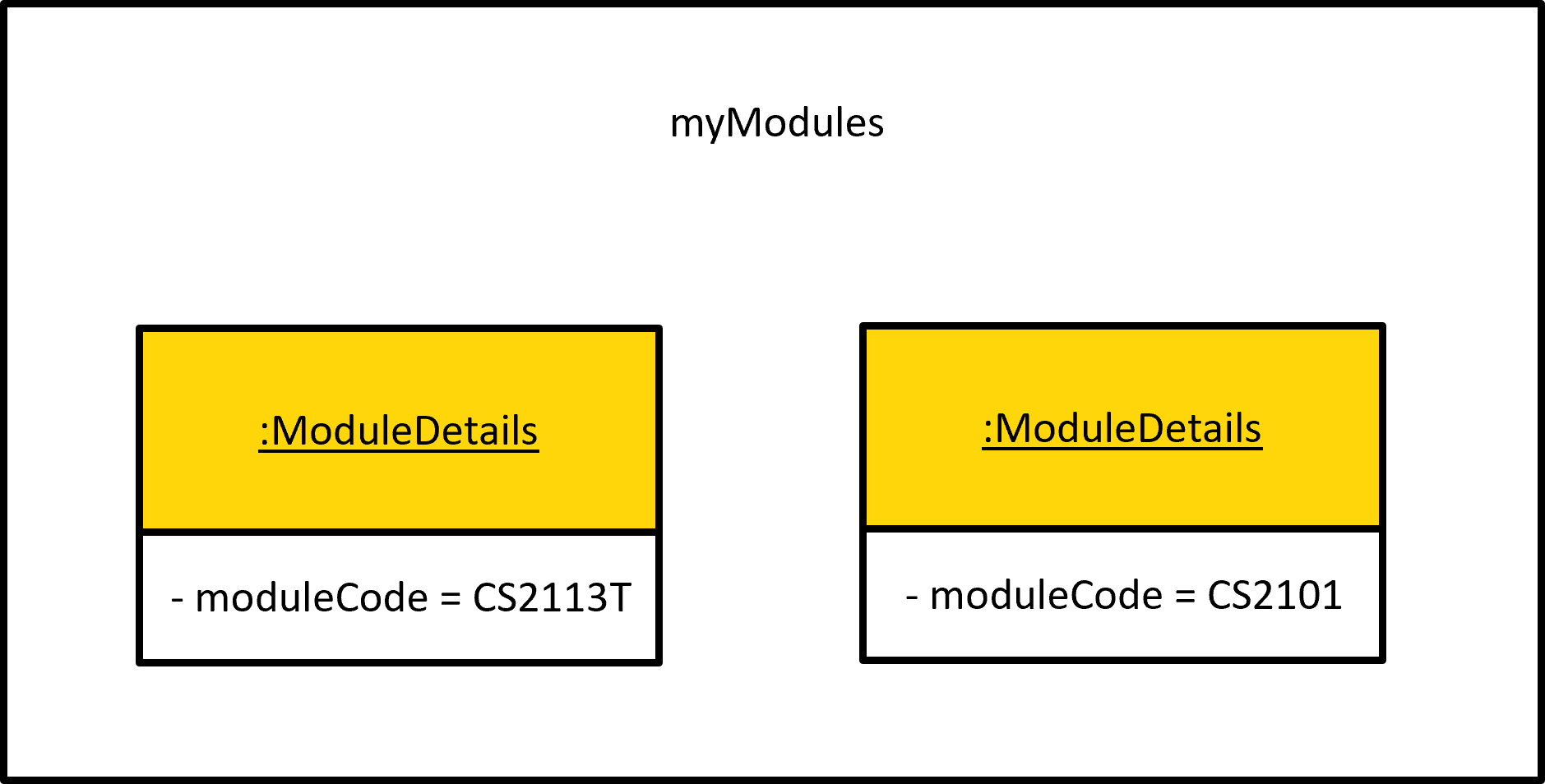
Step 2: The user executes module add CS2101 command to store information regarding CS2101 in a new instance of ModuleDetails and append it to myModules. The module add prefix ensures ModuleList#addModuleByCode(String code, ModuleDb moduleDb) is called.
Step 3: The user executes module delete CS2101 command to delete the instance of ModuleDetais corresponding to CS2101 from myModules. The module delete prefix ensures ModuleList#deleteModuleByCode(String code) is called.
The following sequence diagram models how the module add operation works:
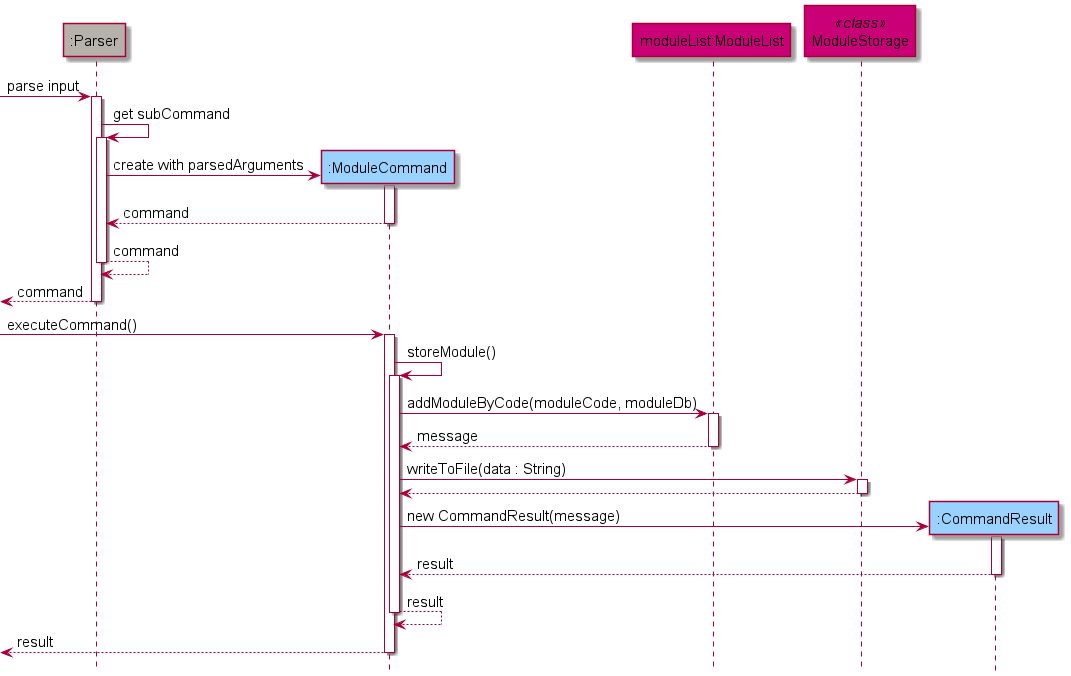
The module delete operation follows a similar sequence. Instead of calling the ModuleCommand#storeModule() method, the ModuleCommand#deleteModule() method is invoked. Internally, this calls the deleteModuleByCode method from moduleList. All other steps remain the same.
CAP Calculator by module code feature
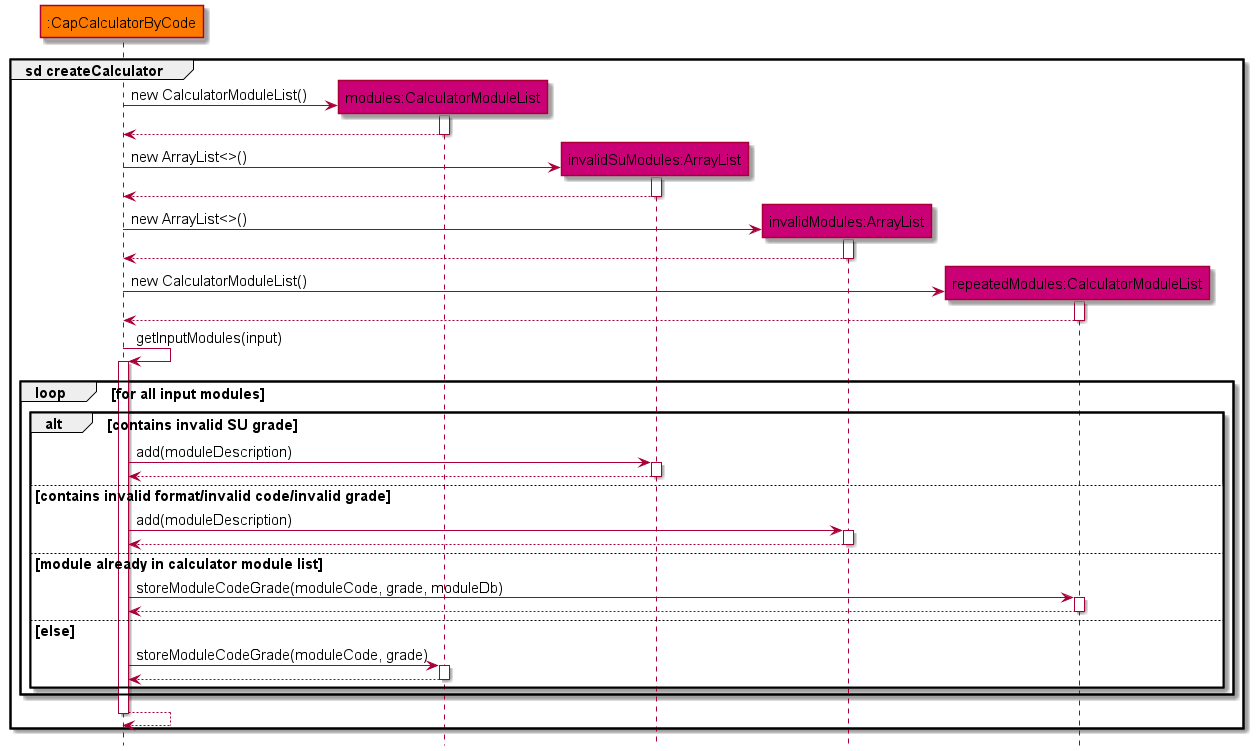
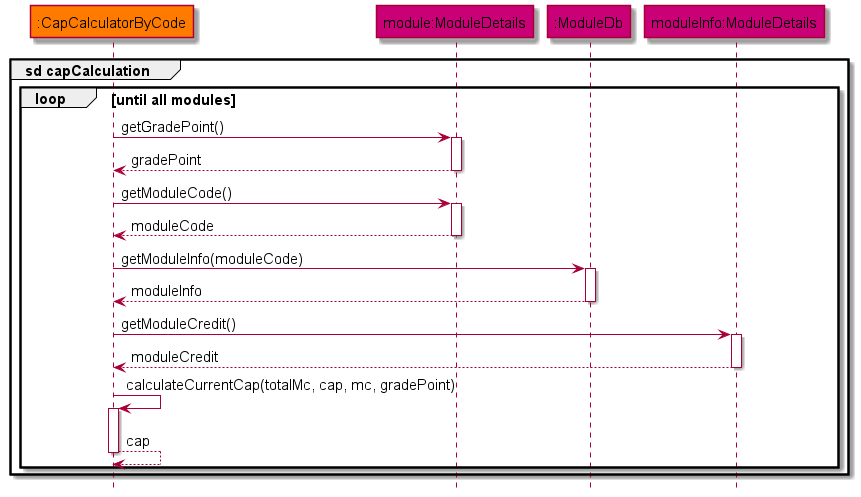
This cap calculation is managed using CapCalculatorByCode. It extends CapCalculator which stores
the input modules and grades from user as a CalculatorModuleList, which is a subclass of ModuleList
dedicated for cap calculation.
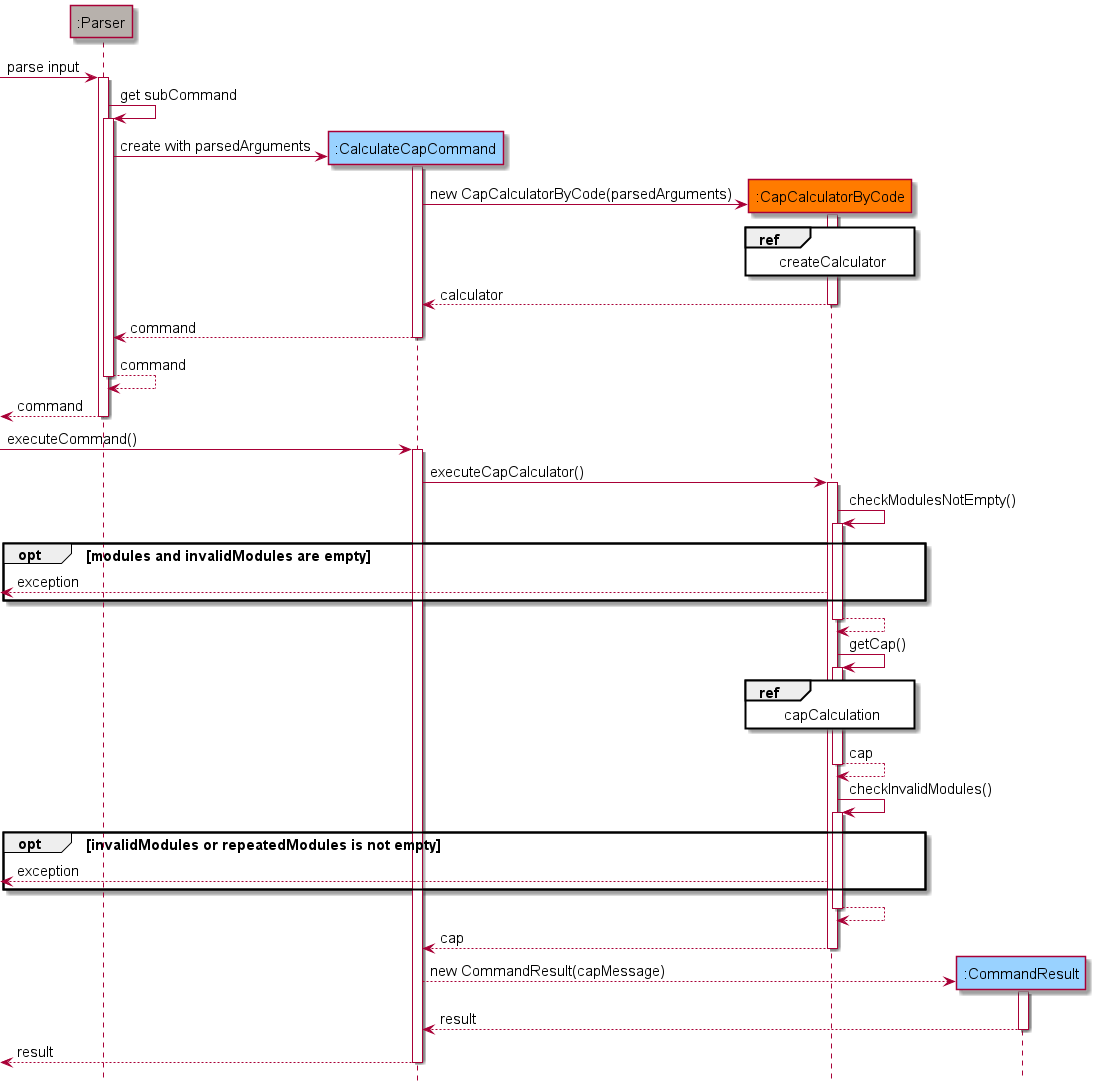
When the command cap code is given by the user, the constructor is called to retrieve and store the modules
from the input. After the object construction is done, CapCalculator#executeCapCalculator() method is then
invoked for the cap calculation.
In order to achieve these functionalities, the following methods from CapCalculatorByCode are invoked.
CapCalculatorByCode#getInputModules(String input)— which retrieves the module codes and grades from String input and store them asCalculatorModuleListCapCalculatorByCode#getCap()— which is the methods used to do all the cap calculation.
In addition, the following methods implemented in CapCalculator are also invoked to ensure an error-free
functionality.
CapCalculator#executeCommand()— which is an overridden method fromCommandis used to facilitate cap calculation and exception handling methods.CapCalculator#checkModulesNotEmpty()— which ensures that the module list of the object is not empty.CapCalculator#checkInvalidModules()— which checks if there are any invalid modules after the cap calculation.
Below is the sequence diagrams showing important steps of how cap code operates:
Bus routes feature
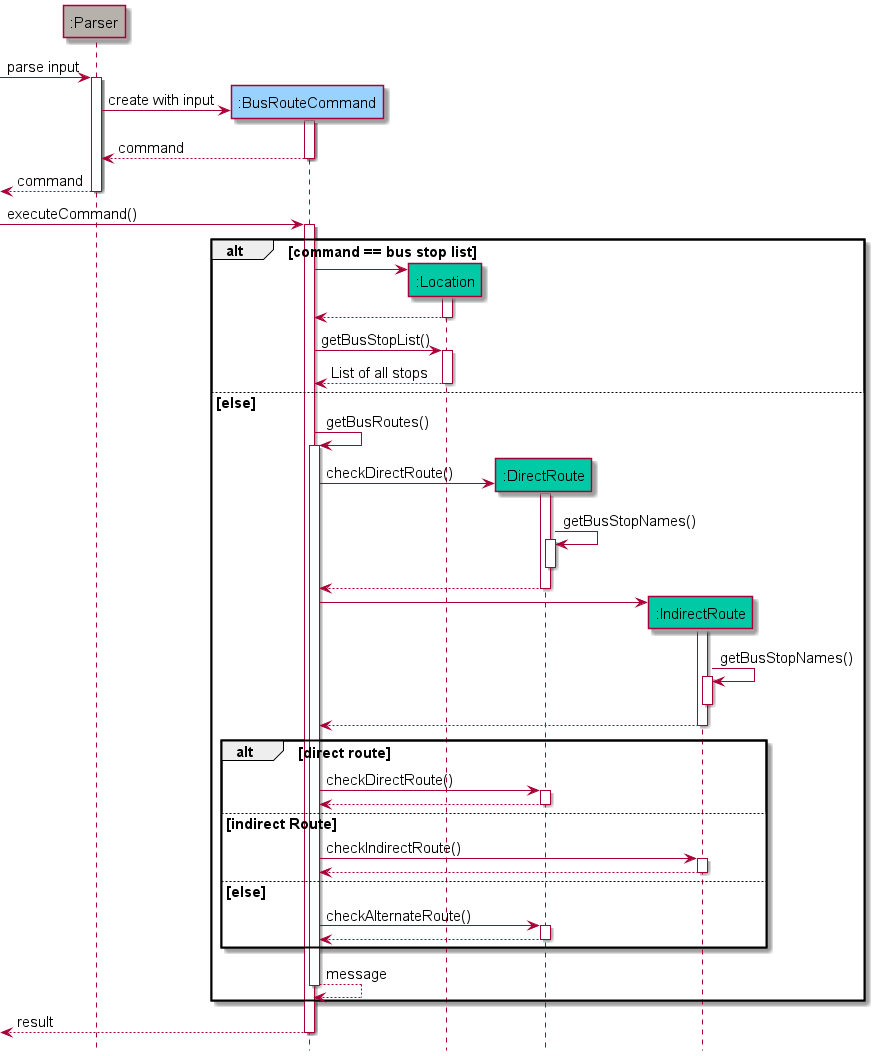
The bus routes feature is facilitated by the BusRouteCommand class. The BusRouteCommand class extends the Command class.
When the user invokes and uses the bus routes feature the BusRouteCommand class instantiates either a Location class
object or DirectRoute and IndirectRoute class object depending on the user input. The operation is implemented in the
following way.
Location#getBusStopList()- Displays the list of all bus stops within the NUS internal bus service routes.DirectRoute#checkDirectRoutes(ArrayList<String> busNumbers)- Checks whether there is a direct bus route between the 2 user given bus stops.IndirectRoute#checkIndirectRoutes(ArrayList<String> busOne, ArrayList<String> busTwo, ArrayList<String> midLoc)- Checks whether there is an alternate route between the 2 user given bus stops which requires a single change of bus at an intermediate bus stop.DirectRoute#checkAlternateDirectRoutes(Arraylist<String> busNumbers)- Checks whether there is a direct alternate route which involves finding a route from an opposite bus stop (if it exists) to the final location.Route#getBusStopNumber()- Converts the user given bus stop name into the corresponding vertex number present in the graph route text fileGraph#isConnected(int u, int v)- Helps to check if 2 vertices in a graph are connected by a path using the BFS algorithm. All the methods which facilitates checking for routes call this method from the classGraph.
❕ Some points about the graph.
- Each bus route has its own graph and the information is stored in text files and are loaded after the
Routeclass constructor is called. - Graphs are modelled by taking each bus stop and assigning it a vertex number.
- A single bus stop may have different vertex numbers on different graphs.
- Vertex numbers range from 0 to n - 1, where n is the total number of bus stops in the particular route
The following sequence diagram gives an overview of the bus routes feature.
Product scope
Target user profile:
- needs help with adapting to university life by understanding the grading system, university bus routes etc.
- has a need to manage their schedule along with the modules they are taking in the semester
- can type fast
- prefers typing to mouse interactions
- is reasonably comfortable using CLI apps
Value proposition:
Users can manage all important university related tasks (Module Manager, Event Planner, Timetable, Bus Route Finder, and CAP calculator) in a single integrated platform.
User Stories
| Version | As a … | I want to … | So that … |
|---|---|---|---|
| v1.0 | As a NUS freshman | be able to view all my modules in one local platform | I can save time |
| v1.0 | As a NUS freshman | view the schedule that I created for myself everyday | I will not miss out on any important tasks for the day |
| v1.0 | As a NUS freshman | add events to my schedule conveniently and ahead of time | I will not forget about them when the day comes |
| v1.0 | As a NUS freshman | find which buses I could take to go from one location to another in campus | I do not get lost within campus |
| v1.0 | As a NUS student | to view my timetable for the modules I’m taking in the current semester | I know what are my commitments of the week are like |
| v1.0 | As a NUS student | add modules that I am interested in taking to my module list | I can start preparing for modreg ahead of time |
| v1.0 | As a NUS student | remove modules that I am no longer interested in taking from my list | I can focus on the modules which I’m interested in |
| v2.0 | As a user | see my plan of the day in a chronological order | I will not miss out any important events |
| v2.0 | As an overwhelmed freshman | be able to delete events from my Planner because of my unpredictable schedule | I can remove cancelled events out of my list. |
| v2.0 | As a user | see a list of my modules | I can plan my academic journey |
| v2.0 | As a user | be able to add events even when it conflicts with another event | I can train my multitasking skills and be more productive. |
| v2.0 | As a user | view my classes when using the Planner for more effective planning of events | I can plan my schedule very precisely |
| v2.0 | As a user | to modify my timetable | I can swap classes after several rounds of modreg |
| v2.0 | As a user | to add the lessons to the timetable based on the modules, in the module list, I’m about to take in the semester | I only need to choose the day and start time of lesson |
| v2.0 | As a user | my module related data must be automatically saved | I can be access it at a later time |
| v2.0 | As a user | continue my module planning where I left off | I can refine my plan over time |
| v2.0 | As a user | store grades for each of my module | I can check my CAP |
Non-Functional Requirements
- Should work on any mainstream OS as long as it has Java 11 or above installed.
- A user with above average typing speed for regular English text (i.e. not code, not system admin commands) should be able to accomplish most of the tasks faster using commands than using the mouse.
- Should be able to execute every command from the user within one second.
Glossary
- Mainstream OS: Windows, Linux, Unix, OS-X
- Event: Personal event added to the Planner by the user
- Lesson: Class (Lecture, Tutorial, Sectional, Recitation, or Lab) for a particular module added to the Timetable by the user
- Exam: Official final examination for a particular module
Instructions for manual testing
Testing Module Manager
-
Storing a new module with a valid code
-
Test case:
module add CS2113TExpected: Initially the module list is empty. One module is added and a success message is printed to standard output.
-
-
Storing a module with an invalid code (non-existent module)
-
Test case:
module add invalid_moduleExpected: There is no module in the database with a code
invalid_module. An error message is shown, prompting the user to enter a valid module’s code.
-
-
Storing a pre-existing module in the list
-
Test case:
module add CS2113TExpected: The module list already contains
CS2113T. Upon encountering a module with a duplicate code, an error message is shown, prompting the user to enter a new module’s code.
-
-
Deleting a pre-existing module from the module list
-
Test case:
module delete CS2113TExpected: Since the module list contains
CS2113T, it is deleted and a successful deletion message is printed to standard output.
-
-
Listing all modules stored in the list
-
Test case:
module listExpected: Key attributes of each module stored in the list are printed to standard output
-
-
Viewing information about a particular module offered by NUS (not necessarily stored in the module list)
-
Test case:
module view CFG1002Expected: Information regarding CFG1002 is printed to standard output.
-
-
Setting a grade for module stored in the user’s module list
-
Test case:
module grade CS2113T/A+Expected: The module list already contains
CS2113T. Upon setting its grade toA+, a message indicating successful update of the grade is printed to standard output.
-
-
Calculate overall CAP of module stored in user’s module list
-
Test case:
module capExpected: If there are modules stored in the module list, the overall CAP is calculated and shown to the user.
-
-
Suggest grade for user to achieve desired CAP
-
Test case:
module cap 3.5Expected: If there are valid modules with no assigned grade stored in the module list, the suggested overall grade to achieve is calculated and shown to user.
-
Testing the Planner feature
-
Adding an event with no time conflicts with any existing events, lessons, or exams to the Planner.
-
Prerequisites: Choose a date that has no exams, lessons, or events planned to ensure no conflicts will occur. You may use
planner clearto clear all existing events stored in planner. -
Test case:
planner add watch movie/2021-10-20/1800/2100Expected: Event is added to the list. Success message printed as output.
-
Test case:
planner add project meeting/20211020/0700/0800Expected: Event is not added to the list. Error message regarding date format printed as output.
-
Test case:
planner add project meeting/2021-02-29/0700/0800Expected: Event is not added to the list. Error message regarding invalid date is printed as output, since 2021-02-29 does not exist.
-
Test case:
planner add go run/2021-10-20/6pm/10pmExpected: Event is not added to the list. Error message regarding time format printed as output.
-
Test case:
planner add go run/2021-10-20/1800/2260Expected: Event is not added to the list. Error message regarding invalid time is printed as output.
-
Test case:
planner add go back in time/2021-10-20/1400/1300Expected: Event is not added to the list. Error message regarding wrong time order printed as output.
-
Test case:
planner add study for test/2021-10-20/1400/1400Expected: Event is not added to the list. Error message regarding same start and end time printed as output.
-
Test case:
planner add /2021-10-20/1400/1600Expected: Event is not added to the list. Error message regarding empty description is printed as output.
-
Other incorrect commands to try:
planner add something wrong//,planner add something amazing/ 3pm to 4pmExpected: Similar to previous cases where an error message regarding the format of command is printed as output.
-
-
Adding an event with time conflicts with at least one existing event, lesson, or exam to the Planner.
-
Prerequisites: Add the event by
planner add pop quiz/2021-11-30/1300/1500. Add the modulemodule add cs2113tand add a lessontimetable add cs2113t/lec/tuesday/1600/1800. Do note 2021-11-30 is a Tuesday. -
Test case:
planner list 2021-11-30Expected: The event
pop quiz, lessonCS2113T LEC, examCS2113T Examare displayed as output. This tests whether the integration among planner, timetable, and module manager is working. -
Test case:
planner add conflict/2021-11-30/xxxx/yyyywherexxxxandyyyyare start times and end times respectively which overlaps with any of the events listed.Expected: Event is not added to the list. A message will be shown seeking permission to proceed with the operation. Entering
ywill lead to a success message, while entering ‘n’ will lead to the operation cancelled. Entering anything else will repeat the prompt.
-
-
Listing events on the Planner.
-
Test case:
planner list 2021-10-10Expected: If there are events stored on
2021-10-10, the events will be listed (including any lessons or exams). Otherwise, a message will be printed stating that there are no events planned for the day. -
Test case:
planner list 20211010Expected: Error message regarding wrong date format is printed as output.
-
Test case:
planner list 2021-02-29Expected: Error message regarding invalid date is printed as output, since 2021-02-29 does not exist.
-
-
Deleting events from the Planner.
-
Prerequisites: Go through point 2 in the Planner section first.
-
Test case:
planner delete 2021-11-30Expected: List of events shown, which only contain the events added via the planner, since users are not supposed to delete exams and lessons from the planner. The corresponding
idofpop quizis also printed. Entering thatidwill lead to a success message, while entering ‘n’ will lead to the operation cancelled. Entering anything else will lead to an invalid id read, abandoning the operation. -
Test case:
planner delete 20211010Expected: Error message regarding wrong date format is printed as output.
-
Test case:
planner delete 2021-02-29Expected: Error message regarding invalid date is printed as output, since 2021-02-29 does not exist.
-
-
Handling the user data in
data/planner.txt-
Test case: Add some events using
planner addcommand and the corresponding data should be written todata/planner.txtafter each addition. The user data includes the description, date, start time, and end time of the event separated by|. -
Test case: Delete some events using
planner deletecommand and the corresponding data should be removed fromdata/planner.txtafter each deletion. -
Test case: Corrupt some data lines in
data/planner.txtby changing the dates or times to an invalid format and start the program again. You should be notified of the data corruption and the corrupted data lines indata/planner.txtwill be removed, leaving only those that are still considered valid.
-
Testing CAP Calculator
-
Calculate CAP from modular credit and grade
-
Test case:
cap mc 4/A 2/B 4/C 4/FExpected: The overall CAP is calculated.
-
Test case:
cap mc 4/A 4/B 4/U 2/SExpected: The overall CAP is calculated while ignoring modules with non-calculating grade.
-
Test case:
cap mc 4/A 4/B 4/ABC 0/C ABCDEExpected: Error message regarding invalid modules will be shown to user.
-
-
Calculate CAP from module code and grade
-
Test case:
cap code CS1010/A CG2027/B CS2113T/C CS2101/FExpected: The overall CAP is calculated.
-
Test case:
cap mc CS1231/A CS1010/S GEQ1000/CSExpected: The overall CAP is calculated while ignoring modules with non-calculating grade.
-
Test case:
cap mc CS1010/A CS0000/B CS2113T/ZExpected: Error message regarding invalid modules will be shown to user.
-
Test case:
cap mc CS2113T/S CS2101/A GEQ1000/AExpected: Error message regarding modules with invalid grading basis assigned will be shown to the user.
-
Finding Bus Routes
- Finding routes.
-
Test case:
bus /IT /UTownExpected: Shows a direct bus route.
-
Test case:
bus /UTown /KR Bus TerminalExpected: Shows an indirect route where user will need to change buses at an intermediate stop.
-
Test case:
bus /PGPR /KR MRTExpected: Shows alternate direct route from the opposite bus stop.
-
Note: Bus stop names are not case sensitive.
-
List all bus stops
-
Test case:
bus stop listExpected: Shows the list of all bus stops.
-
Testing the Timetable feature
-
Adding to timetable without exceeding workload
- Prerequisites : Ensure to follow the prescribed workload in
module list -
Test case:
timetable add CS1010/LEC/monday/1300/1400Expected: Lesson will be added without any errors
-
Test case:
timetable add CS1010/lecture/monday/1500/1600Expected: Lesson will not be added as timetable only accepts lesson type of the following formats:
LEC,TUT,SEC,LAB,REC. -
Test case:
timetable add CS1010/LEC/sat/1500/1600Expected: Lesson will not be added as timetable only accepts days from monday to friday spelt fully.
-
Test case:
timetable add CS1010/LEC/monday/1515/1600Expected: Lesson will not be added as timetable only timings in multiples of 30 mins
-
Test case:
timetable add CS1010/LEC/sat/1500/1600followed bytimetable add CS1231/LEC/sat/1500/1600Expected: Lesson will not be added as timetable does not accept 2 lessons to be added in the same timeslot
-
Test case:
timetable add CS1010/LEC/monday/2100/2200Expected: Lesson wil not be added as the allowed school hours are 0600 - 2100, the starting time of a lesson cannot be earlier than 0600 and the ending time cannot be later than 2100
- Prerequisites : Ensure to follow the prescribed workload in
-
Adding lesson to timetable which exceeds the workload
-
Test case:
timetable add CS1010/LEC/monday/1300/1900followed byyExpected: Program will output a prompt to confirm if you want to continue adding despite exceeding workload and by entering
yafter this prompt will add the lesson to the timetable -
Test case:
timetable add CS1010/LEC/monday/1300/1900followed bynExpected: Program will output a prompt to confirm if you want to continue adding despite exceeding workload and by entering
nafter this prompt will cancel the operation of adding the lesson -
Test case:
timetable add CS1010/LEC/monday/1300/1900followed bysusExpected: Program will output a prompt to confirm if you want to continue adding despite exceeding workload and by entering a key which is not
yornafter this prompt will display an invalid key error message until you input one of the valid keys:yorn
-
-
Deleting lesson from timetable
-
Test case:
timetable delete CS1231/tut/monday/1200Expected: Lesson will be deleted from timetable
-
Test case:
timetable delete CS1231/tut/monday/1200but lesson not added to timetable in the first placeExpected: Lesson will not be deleted from timetable as the lesson does not exist in timetable
-
Test case:
timetable delete CS1231/tut/mon/1200Expected: Lesson will not be deleted from timetable as timetable only accepts days from monday to friday spelt fully.
-
Test case:
timetable delete CS1231/tutorial/monday/1200Expected: Lesson will not be deleted as timetable only accepts lesson type of the following formats:
LEC,TUT,SEC,LAB,REC.
-
-
Update timetable
-
Test case:
timetable update CS1231/tut/monday/1200/tuesday/1200Expected: Lesson will be updated
-
Test case:
timetable update CS1231/tut/monday/1200/tuesday/1200but lesson not added to timetable in the first placeExpected: Lesson will not be updated as the lesson does not exist in timetable
-
Test case:
timetable update CS1231/tut/mon/1200/tuesday/1200Expected: Lesson will not be updated as timetable only accepts days from monday to friday spelt fully
-
Test case:
timetable update CS1231/tutorial/monday/1200/tuesday/1200Expected: Lesson will not be updated as timetable only accepts lesson type of the following formats:
LEC,TUT,SEC,LAB,REC. -
Test case:
timetable update CS1231/tut/monday/1200/monday/1200Expected: Lesson will not be updated as the timing and day given is updating the lesson to the same timing and day
-
-
View timetable
-
Test case:
timetable viewExpected: Timetable will be printed onto the CLI
-
-
List timetable
-
Test case:
timetable list mondayExpected: The lessons occurring on monday and their timings will be listed on the CLI
-
Test case:
timetable list satExpected: Lessons will not be listed as the day needs to be from monday to firday and spelt fully
-